Your privacy. Your efficiency.
Automatically sort Gmail into real nested folders
Auto-sort rules file every email the moment it arrives, into a real folder tree, not labels. No Gmail permission. No servers. Nothing leaves your browser.
Your June invoice is attached. Payment is due on the 30th.
Feature 01
Auto-sorted before you see it
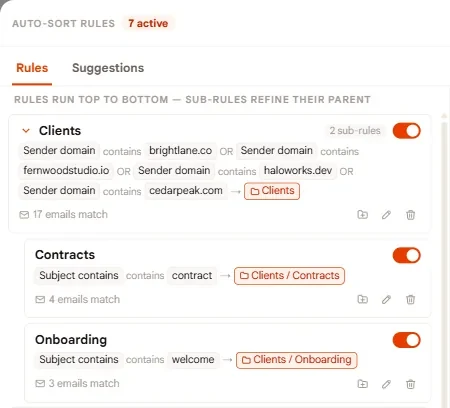
Auto-sort rules read the sender, the subject and the unsubscribe header, then file each email into your folders the moment it arrives. Built in seconds, suggested from your own inbox.
Feature 02
Everything has a place
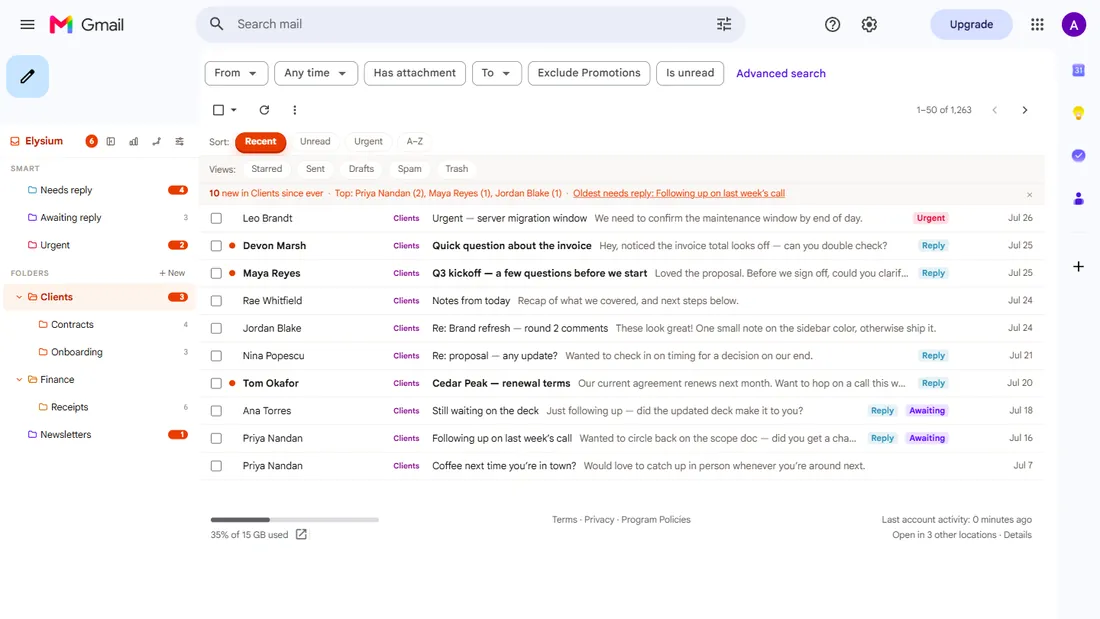
Real nested folders inside Gmail: smart folders, colors, unread counts, and a living network graph where every sender and domain is one click from a filtered view.
Feature 03
Understood, locally
Volume, reply latency and unread aging, computed in your browser from your own index. No servers ever see a byte of it.
Every email lands where it belongs, in your browser, before you even look.
01. Efficiency
An inbox that sorts itself, automatically
Nested folders
Real folder trees inside Gmail: smart folders, color coding, unread counts, and a sidebar that collapses out of your way and glides back on hover.
Auto-sort rules
Build rules in seconds, or accept the ones Elysium suggests from your own inbox patterns. New mail files itself before you see it.
Living network graph
Your senders, domains, and folders as a living map, with curved edges, traveling light, and every node a filter. Navigation, not decoration.
When email arrives
A contribution-style grid of your mail activity that spots your noisy hours at a glance.
Volume, measured
Daily volume, reply latency, unread aging, and unsubscribe candidates, all computed locally.
Zero noise
No badges begging for attention and no upsells in your inbox. A tool that stays out of the way until you need it.
02. Privacy
Nothing leaves
your browser
Privacy here isn't a policy, it's the architecture. There is no Elysium server. There is nothing to breach, sell, or subpoena.
No Gmail permission
No OAuth, no scope, no consent screen. Email Elysium requests nothing from Google at all. It reads the message list Gmail has already rendered in your tab, so there's no API access to send, delete, or modify anything even if it wanted to.
No servers
Sorting, rules, graphs, and analytics all run inside Chrome on your device and are stored in local extension storage. Wipe it all with one click, any time.
Nothing to sell
No analytics beacons, no trackers, no third-party requests. Your email metadata never becomes someone else's product.
03. Pricing
Minimal cost.
Minimal headaches.
Free
Full inbox sorting, rules, and smart folders. No trial, no caps, no catch.
- Unlimited nested folders & smart folders
- Auto-sort rules + rule suggestions
- Smart folders: Urgent, Needs Reply, Awaiting Reply
- Snooze + unsubscribe surfacing
- Local inbox analytics
- No Gmail permission at all, nothing leaves your browser
Premium
or $40/year, 2 months free
Use the free tier first. When you want the graph, upgrade from the popup. Nothing to re-install, no signup step.
- Everything in Free
- Living network graph of your inbox: folders, senders, domains & emails, connected
- Open tracking, opt-in, per email, off by default
- Meeting scheduling: a personal booking page for your recipients
Checkout lives in the extension popup, so your subscription binds to your browser. Cancel any time.
04. FAQ
Common questions
Can Gmail sort emails into folders automatically?
Gmail can auto-sort with filters, but only into labels, and labels are tags, not locations. Email Elysium adds auto-sort rules that file each email into a real nested folder tree the moment it arrives, and it suggests rules from the patterns already in your inbox instead of making you build every one by hand.
How do I automatically categorize emails in Gmail?
Gmail's built-in categories (Primary, Promotions, Social, Updates) are fixed. You can turn them on or off, but you can't add your own. For categories you define, you need rules. Email Elysium matches on sender, domain, subject, or the unsubscribe header and files mail into folders you name yourself, nested as deep as you like.
What does "Nest label under" do in Gmail?
It makes one label a sublabel of another, which is Gmail's only built-in nesting. It works one level deep, the sublabels are collapsed by default, and the expand state doesn't reliably persist, which is why nested labels so often look like they've vanished.
Does Email Elysium need permission to read my Gmail?
No. There is no OAuth, no scope, and no consent screen. It requests nothing from Google at all. It reads the message list Gmail has already rendered in your tab, so it has no API access to send, delete, or modify anything even if it wanted to.
Is Email Elysium free?
The folder tree, auto-sort rules, smart folders, snooze, unsubscribe surfacing, and local analytics are all free, with no trial and no caps. Premium ($4/month or $40/year) adds the network graph, opt-in open tracking, and a booking page.
Do the folders sync to my phone or Outlook?
No, and that's the honest tradeoff of running entirely in your browser. Your folder tree lives in the Gmail tab on the computers where you've installed the extension. Nothing is written back to your Google account, so nothing follows you to the Gmail mobile app or an IMAP client.
Take your inbox back
Install in seconds. No Gmail permission to grant or revoke. Your email stays yours the entire time.
Add Email Elysium to Chrome (opens in new tab)